


SetMoveJumpHeight#
This command prescribes the exact distances the end-effector must move up or down,
with a pure vertical translational motion, during the vertical portions of the
MoveJump movement. It also prescribes the minimum and maximum allowed
heights for the lateral motion (see Figure 11).
Syntax#
SetMoveJumpHeight(hstart,hend,hmin,hmax)
Arguments#
hstart: height of the initial pure vertical translation, in mm, from −102 to 102;
hend: height of the final pure vertical translation, in mm, from −102 to 102;
hmin: minimum height to reach while performing the lateral motion, with respect to the highest (if hstart and hend are positive) or lowest (if hstart and hend are negative) between the start and end poses, in mm, from −102 to 102;
hmax: maximum height to reach while performing the lateral motion, with respect to the highest (if hstart and hend are positive) or lowest (if hstart and hend are negative) between the start and end poses, in mm, from −102 to 102.
Note
The direction of the heights (positive or negative) is with respect to the z-axis of the BRF. Use negative values if your robot is mounted upside-down (and your tool is installed at the flange farthest from the robot base).
Default values#
The default settings are applied whenever the robot is activated or reactivated.
By default, hstart = hend = 10, hmin = 0, hmax = 102.
The default values for hmin and hmax give full freedom to choose the
optimal (quickest) path between the start and end poses. You may change hmin
and hmax to avoid obstacles between the start and end poses, but be aware
that this may result in slower (suboptimal) cycle times. Also, note that the highest
point during the lateral motion can happen anywhere, not necessary in the middle. In
addition, note that changing the joint velocities with the command
SetJointVel will also change the profile of the lateral motion.
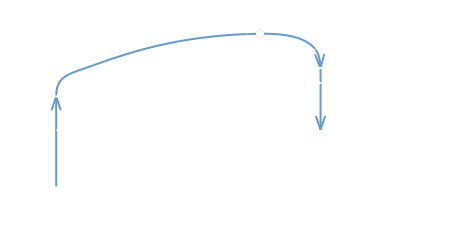
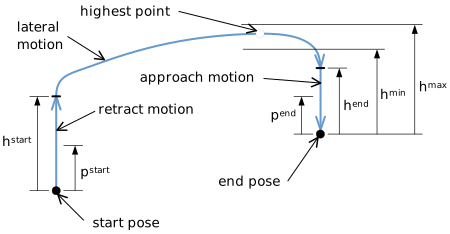
Figure 11 Settings for the MoveJump motion (projection on a vertical plane, the actual path is not in one plane)#
Usage restrictions#
This command is added to the robot’s motion queue and can only be executed when the robot is ready for motion, not in an error state and when no safety signal conditions are present. Otherwise, the robot will report one of the following:
[1005][The robot is not activated.]
[1011][The robot is already in error.]
Cyclic protocols#
In cyclic protocols, the SetMoveJumpHeight command is represented by
MotionCommandID 46. See Section 4.2 for more details.