


3. Technical specifications#
The following table lists the main technical specifications of the Meca500 robot arm.
Characteristics |
Value |
|---|---|
Position repeatability |
0.005 mm |
Rated payload |
0.5 kg |
Weight (without the cables) |
4.6 kg |
Maximum reach at flange |
330 mm |
Mounting orientations |
any angle |
Range for joint 1 |
[−175°, 175°] |
Range for joint 2 |
[−70°, 90°] |
Range for joint 3 |
[−135°, 70°] |
Range for joint 4 |
[−170°, 170°] |
Range for joint 5 |
[−115°, 115°] |
Range for joint 6 |
[−36,000°, 36,000°] |
Maximum speed for joints 1 & 2 (R3|R4) |
150°/s | 225°/s |
Maximum speed for joint 3 (R3|R4) |
180°/s | 225°/s |
Maximum speed for joints 4 & 5 (R3|R4) |
300°/s | 350°/s |
Maximum speed for joint 6 (R3|R4) |
500°/s | 500°/s |
Maximum acceleration torque for joints 1, 2, 3 (R3|R4) |
16.6 Nm | 16.6 Nm |
Maximum acceleration torque for joints 4 & 5 (R3|R4) |
2.5 Nm | 2.5 Nm |
Maximum acceleration torque for joint 6 (R3|R4) |
1.5 Nm | 1.5 Nm |
Maximum continuous torque for each joint |
50% of the acceleration torque value |
Input voltage |
24 V (DC) |
Maximum input current |
5.5 A |
Operating ambient temperature range |
[5°C, 35°C] |
Operating ambient relative humidity range |
[10%, 80%] (non-condensing) |
Airborne noise level |
50dB (only when the robot is moving fast; when it is immobile, the noise is barely perceptible) |
Maximum operating altitude |
2000 m |
Cleanroom classification |
ISO Class 6 |
Figure 18 shows all the link lengths and offsets of the Meca500, necessary for obtaining the so-called Denavit-Hartenberg parameters. Note that all joints are at zero degrees in the configuration drawn in black line. Also note that the gray zone is the area attainable by the center of the robot’s wrist (the intersection point of the last three axes), for a fixed angle of joint 1. This area, or even the volume obtained by sweeping this area about the axis of joint 1 is NOT the workspace of the robot. The workspace of the robot is a six-dimensional entity depending on the definition of the tool reference frame. The workspace is the set of all attainable poses (positions and orientations) of the tool reference frame with respect to the robot’s base. Even for a specific choice of a tool reference frame, it is impossible to represent this six-dimensional workspace (read this tutorial of ours).
Similarly, while the maximum tool-center point (TCP) speed is software limited to 5,000 mm/s when the robot executes Cartesian-space motion commands, it makes little sense to specify here the actual maximum attainable TCP speed. Indeed, the actual maximum TCP speed is highly dependent on the robot joint position and, of course, on the TCP definition. For example, for a TCP that is located some 50 mm away from the robot’s flange, along the axis of joint 6, the maximum attainable TCP speed is approximately 3,500 mm/s for the Meca500 R4, when the robot is fully stretched and all joints rotate at full speed. However, in most situations, the maximum TCP speed will be much lower.
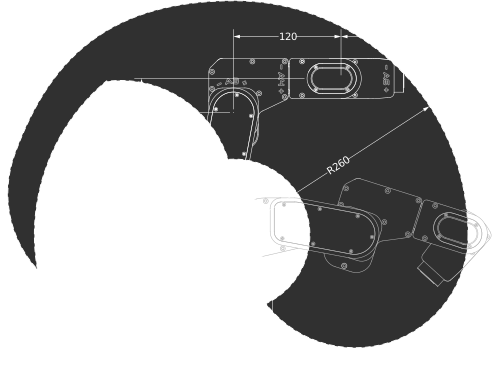
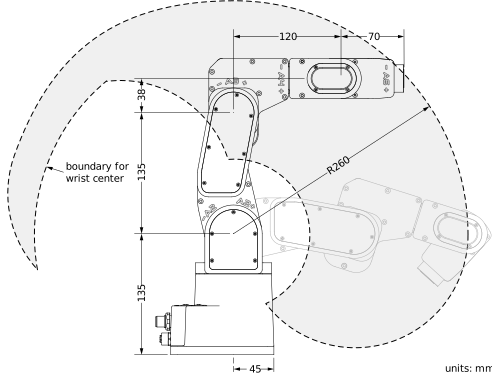
Figure 18 The dimensions of the Meca500 (R3 and R4)#
Figure 19 and Figure 20 present the payload charts of the Meca500 (R3 and R4), where each curve indicates the limit corresponding to the position of the payload’s center of gravity. The charts show two payloads, at various maximum joint accelerations, as well as at maximum joint velocities. These charts are guidelines rather than strict limits and are valid for firmware 10.3 and later versions. Depending on the application and the robot’s motion, it is sometimes possible to exceed the values shown. For example, you can use 100% joint acceleration with a 500 g payload if joint 6’s axis is aligned with gravity. Higher accelerations may also be used when velocities are lower. In practice, joints 5 and 6 are usually the limiting ones and are the first to cause motion errors.
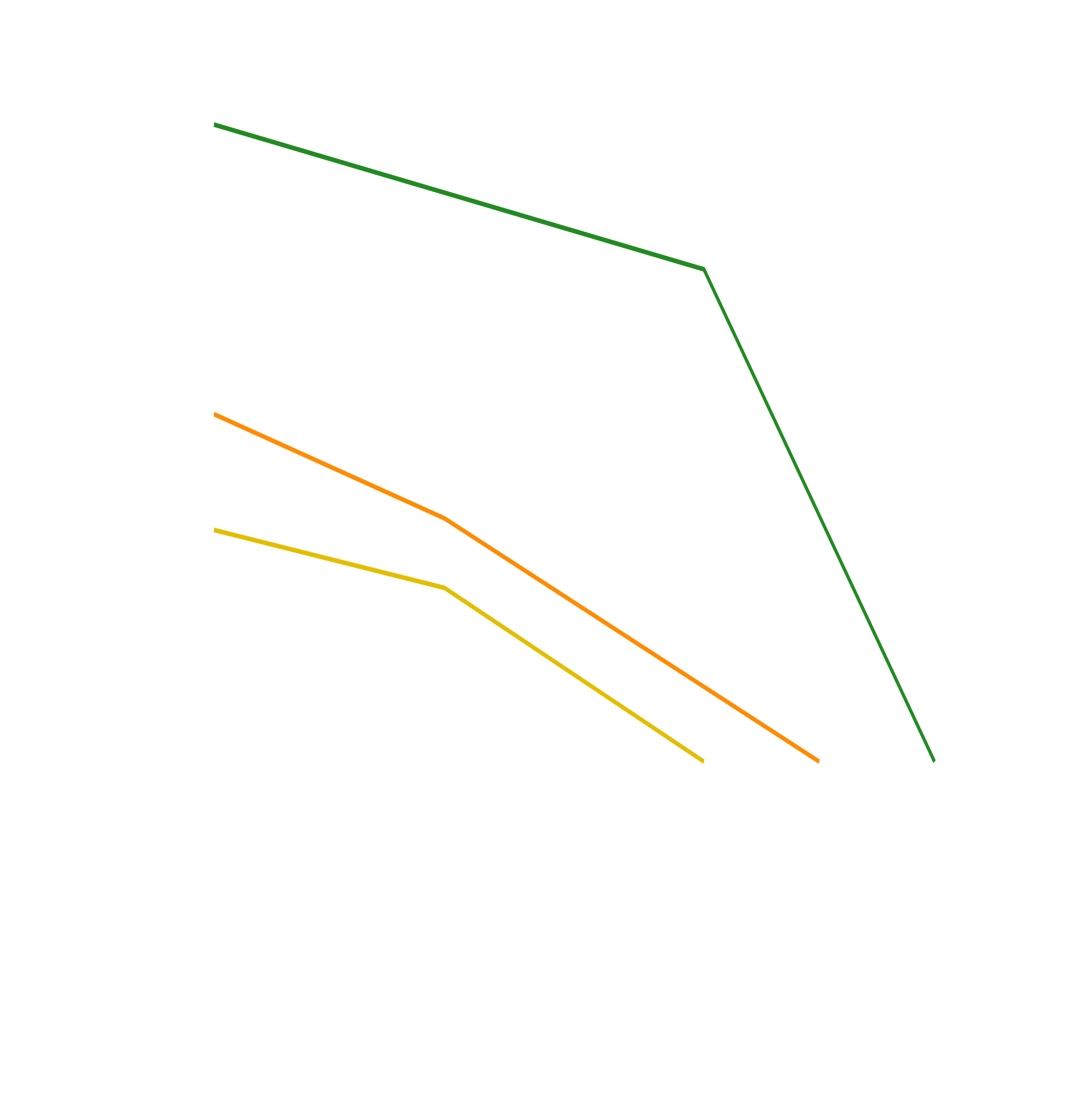
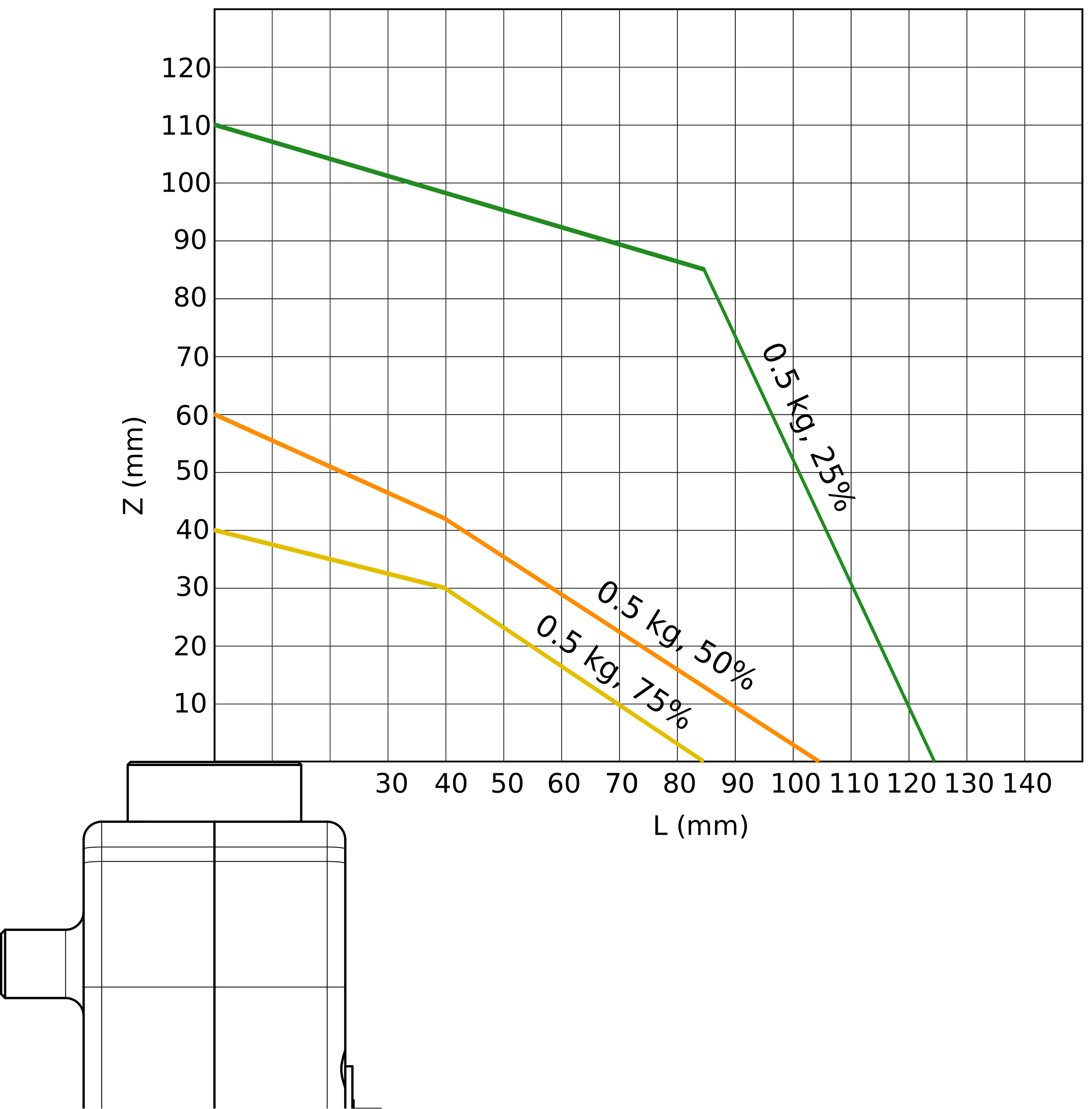
Figure 19 Payload charts for 0.5 kg for the Meca500 (R3 and R4) for different maximum joint accelerations#

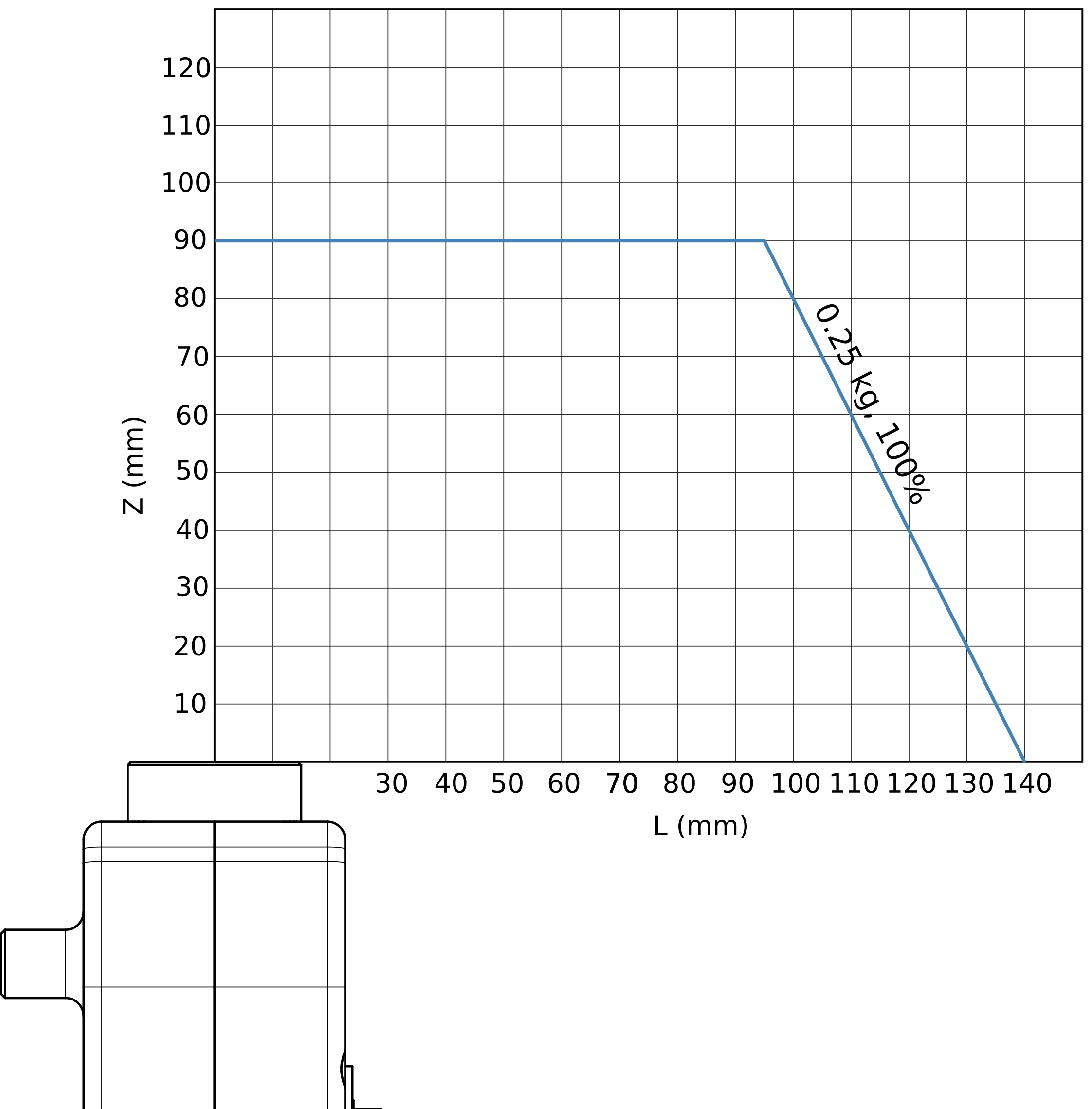
Figure 20 Payload chart for 0.25 kg for the Meca500 (R3 and R4) for 100% maximum joint acceleration#
Table 8 lists the technical specifications for the PS200 module for both R3 and R4 revisions of the Meca500. As already mentioned, the PS200 provided has an IEC C14 connector that accepts an AC power cord with three-prong IEC C13 connector on one end, and your own country’s power plug on the other. You can connect this power cord to any AC source that supplies voltage between 90 V and 250 V at frequency between 50 Hz to 60 Hz. We also recommend that you use a surge protector.
Warning
We recommend that you use a surge protector when connecting the PS200 module to an AC power source.
Characteristics |
Value |
|---|---|
Weight |
0.7 kg |
Mounting orientations |
any angle |
Input voltage range |
[90 V, 250 V], AC, single phase |
Input frequency range |
[50 Hz, 60 Hz] |
Maximum input current |
4 A |
Input power connector |
IEC C14 |
Power factor |
0.95 |
Maximum power output |
132 W at 5% duty cycle |
Maximum measured leakage current |
0.047 mA |
System grounding type |
TN |
Operating ambient temperature range |
[5°C, 35°C] |
Operating ambient relative humidity range |
[10%, 80%] (non-condensing) |
Maximum operating altitude |
2000 m |
Robot body material |
Anodized aluminum alloy |
IP rating |
IP40 |
Table 9 and Table 10 list the requirements for the I/O connections on the PS200 module in the case of the Meca500 R3 and R4, respectively. Further details will be provided in Section 2.3.
Parameter |
Min. |
Typical |
Max. |
Unit |
|---|---|---|---|---|
Safety input voltage |
5 |
– |
24 |
V |
Safety input current |
– |
24 |
24 |
mA |
Power status output voltage |
0 |
– |
24 |
V |
Power status output current |
0 |
– |
60 |
mA |
Parameter |
Min. |
Typical |
Max. |
Unit |
|---|---|---|---|---|
Safety input voltage |
5 |
– |
24 |
V |
Safety input current |
– |
– |
10 [1] |
mA |
Power status output voltage |
0 |
– |
24 |
V |
Power status output current |
0 |
– |
60 |
mA |
Finally, the CAD files of the Meca500 robot arm and of its PS200 module (in STEP format) can be downloaded from here. You can also use one of several robot simulation and offline programming software packages that include a model of our Meca500, including Visual Components and RoboDK. Note that we also offer a Mecademic-only version of RoboDK, for exclusive use with our robots.