


Work zone supervision and collision prevention commands#
In addition to using the SetJointLimits and SetJointLimitsCfg
commands to further constrain the robot’s joint limits, you can also define a work zone
with the SetWorkZoneLimits command (see Figure 13). This
command sets a bounding box in the Base Reference Frame (BRF). Similarly, you can
define a “tool sphere” in the Flange Reference Frame (FRF) using the
SetToolSphere command.
You can then use the SetWorkZoneCfg command to configure the robot to monitor
whether its links, tool sphere (including optional tooling), or Flange Center Point
(FCP) remain within the work zone. Additionally, the SetCollisionCfg command
enables the robot to prevent collisions between its links, tool sphere, and optional
tooling.
For both configurations, you can choose to have the robot either generate a warning (supervision only) or create a motion error (preventing a work zone breach or collision). Typically, you will want to prevent collisions, which is why the term “collision prevention” is used. Conversely, you may only wish to detect work zone breaches without preventing them, hence the term “work zone supervision.”
Note that you can use the MecaPortal to define these settings. For example, you can enable the display of the work zone and tool sphere through the settings menu in the 3D view panel of the MecaPortal. When collisions occur, the colors of the colliding bodies will change to red.
Figure 13 illustrates the objects currently supervised. The base STL model also includes part of the cables coming from the base (not shown).
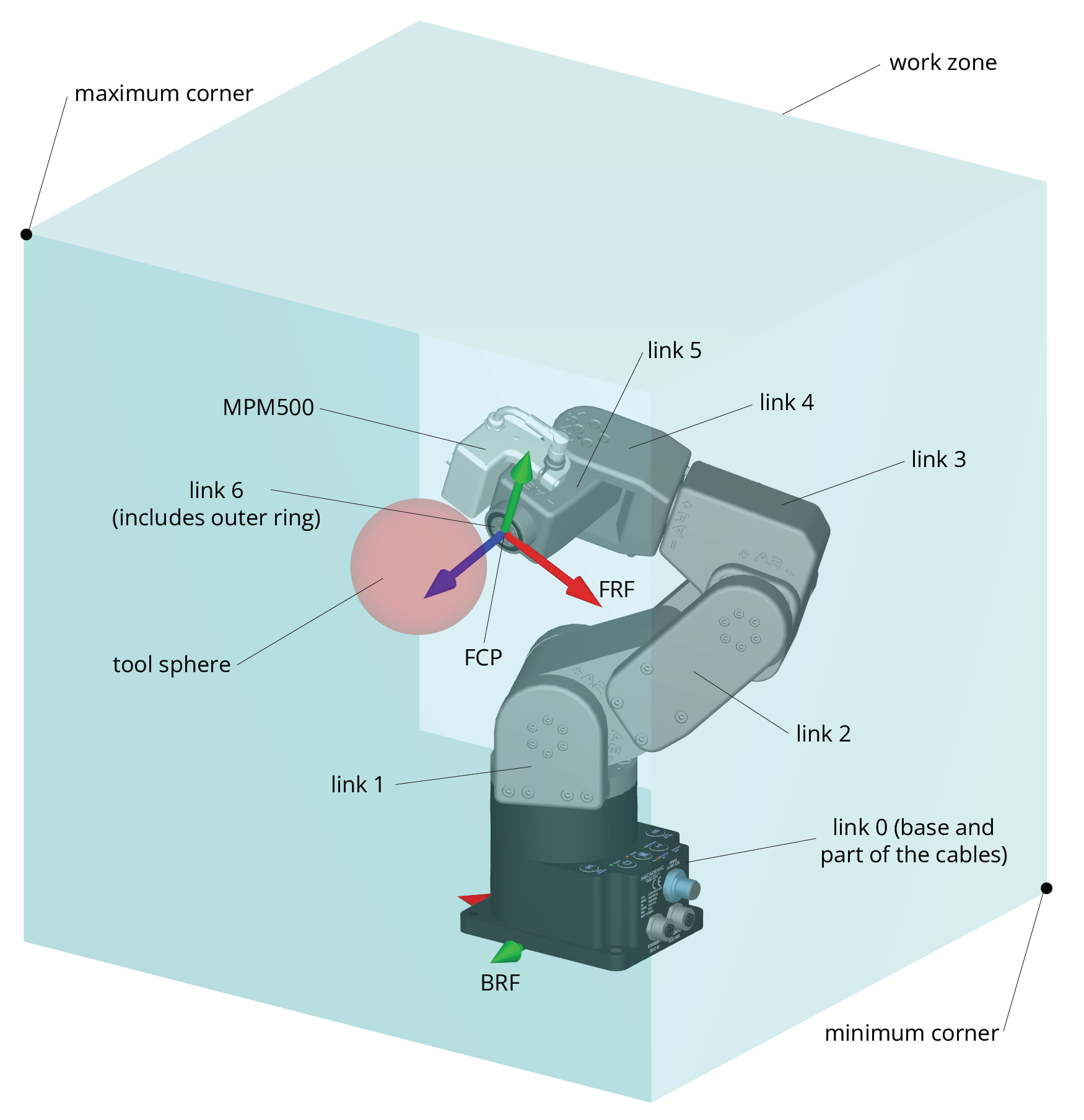
Figure 13 Objects tested in the work zone supervision and collision prevention feature#
Danger
The work zone supervision and collision prevention feature is not safety rated. Additionally, when the robot handles heavy or large objects at high speeds and with significant blending, there is a possibility that work zone breaches or collisions may be detected a few milliseconds too late.
The following is the complete list of work zone supervision and collision prevention commands, in alphabetical order: