


5. Operating the module#
The MVK01 vacuum and I/O module is controlled in the same way as the MCS500. For
example, you can control the vacuum using the commands
VacuumGrip/VacuumRelease and configure it using the commands
SetVacuumThreshold, SetVacuumPurgeDuration. You can also set the
outputs using the command SetOutputState and read the inputs using the
command GetRtIoStatus. For a complete description of these and other
commands, refer to the Mecademic robot’s programming manual.
5.1. Adjusting the purging force#
The MVK01 is equipped with a purging function for quickly ejecting a part. During
purging, the negative pressure at the suction cup is essentially quickly transformed
into positive pressure. The duration of the air purge is set with the command
SetVacuumPurgeDuration. You can also control the force of the purging (i.e.,
the purge air flow) using the rotating knob marked ADJ, next to the three ports on the
MVK01 module. When the knob is completely screwed in, the force of purging is smallest.
The more you unscrew the knob, the larger the purging force. You will need a flat 0.4 mm
screwdriver for this operation.
5.2. Firmware update#
The MVK01 module will be automatically updated to the same version as the MCS500 robot, either during the update of the robot (if the module is present) or during the first boot of the robot with the MVK01 installed.
5.3. Integration into the MecaPortal#
The MecaPortal web interface automatically recognizes the MVK01 module and displays a CAD model of it underneath the MCS500, as well as a widget specific to the module (Figure 13). In the widget, you can control the eight digital outputs, see the status of the eight digital inputs, control the suction action, and see the pressure in the vacuum chamber.
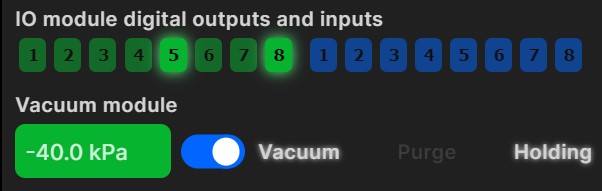
Figure 13 Widget that appears in the MecaPortal jogging panel when the MVK01 is detected#
5.4. Safety#
The MVK01 vacuum and I/O module is designed with safety in mind. However, additional tools connected to the VAC port may lead to risks of injuries. Make sure that all connections are properly made and that you respect the technical specifications of the MVK01 module. Regularly make sure that the suction cup holder is solidly attached to the spline shaft.
5.5. Resets of the state of the MVK01#
If an activated robot with an MVK01 module becomes deactivated, the MVK01 retains its state (i.e., if it was generating vacuum, it will continue to do so, and all outputs will remain the same).
However, if an E-Stop or a P-Stop 1 is activated or in the case of various other events that cut power to the robot motors (e.g., changing the operating mode), the vacuum generation is ceased but the state of all eight outputs remains unchanged. You can also continue to read the inputs.
Danger
When power to the robot motors is removed (e.g., during an E-Stop), the vacuum generation is ceased. Therefore, if the robot’s suction cup is holding a part, the part will fall.